AMD Adrenalin 26.11.1 Fixes the Radeon SSD Write Bug: Who Needs It and How to Update Safely
A background Radeon process was quietly writing gigabytes to some players' system drives every day. AMD's new optional driver fixes it. Here's how to tell if you were affected, and the right way to update.

AMD Adrenalin 26.11.1 is an optional Radeon driver, released on 12 November 2026, that fixes a bug where a background AMD process kept writing data to your system drive, even when the PC was idle. If you own a Radeon RX 7000 or RX 9000 graphics card and you are on driver 26.10.1 or 26.10.2, AMD Adrenalin 26.11.1 is the update to install, according to AMD’s official release notes.
The bug didn’t hurt frame rates, which is why many players never noticed it. But it could add tens or even hundreds of gigabytes of writes to an SSD per day on affected machines. This guide explains what went wrong, how to check whether your PC was hit, how to install the fix cleanly, and which temporary workarounds you should now undo.
 SHORT
Key facts
- Driver: AMD Software: Adrenalin Edition 26.11.1, optional, released 12 November 2026 (AMD)
- Fix 1: excessive writes to the system drive while idle on Radeon RX 7000 series and above
- Fix 2: excessive writes while moving or resizing application windows
- Culprit: AMD External Events Client Module, atieclxx.exe, in drivers 26.10.1 and 26.10.2 (TechPowerUp)
- Reported write rates: 0.3 to 1.5 MB/s, with one report of 5 MB/s (VideoCardz)
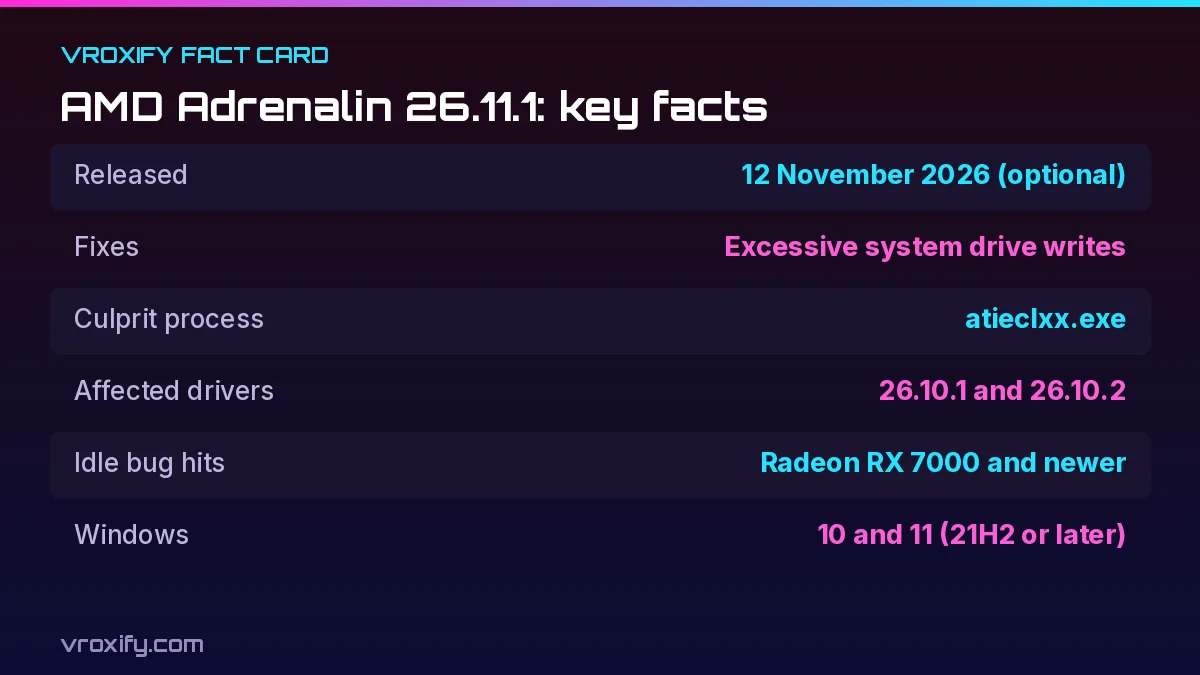
What does AMD Adrenalin 26.11.1 fix?
The release notes list just two fixed issues, and both are about storage:
- Idle writes. “Excessive writes to the system drive” could happen while the system was idle on Radeon RX 7000 series graphics and newer.
- Window writes. Excessive writes could also happen while moving or resizing application windows. AMD doesn’t say which graphics products were affected by this second issue.
AMD also updated a dedicated support article, PA-365, titled “AMD Software: Adrenalin Edition SSD Write Issue”. It says the idle problem affected Radeon RX 7000 and RX 9000 series products, that AMD has resolved it, and that affected users should install AMD Adrenalin 26.11.1.
What is atieclxx.exe?
atieclxx.exe is the AMD External Events Client Module. It belongs to the AMD External Events Utility, a Windows service that handles display-related jobs such as detecting monitors and responding to Radeon Software hotkeys. It has shipped with Radeon drivers for many years and is normally harmless.
In drivers 26.10.1 and 26.10.2, the process got stuck writing data to the system drive in a loop on some PCs. TechPowerUp, citing user reports first gathered by VideoCardz, said write rates ranged from about 0.3 MB/s to 1.5 MB/s, with one Reddit user seeing 5 MB/s.
Timeline of the bug
| Date (2026) | What happened |
|---|---|
| October | Users report constant drive writes; an AMD community representative says the company is investigating, according to VideoCardz |
| 9 November | VideoCardz reports AMD has confirmed the bug and says Adrenalin 26.11.1 should fix it |
| 10 November | TechPowerUp names drivers 26.10.1 and 26.10.2 and the atieclxx.exe process |
| 12 November | AMD releases Adrenalin 26.11.1 and updates support article PA-365 |
How serious was the atieclxx.exe write bug?
Those numbers sound small, but they add up because the process kept going all day:
| Sustained write rate | Per hour | Per day (24h) | Per month (30 days) |
|---|---|---|---|
| 0.3 MB/s | about 1.1GB | about 26GB | about 0.8TB |
| 0.65 MB/s | about 2.3GB | about 56GB | about 1.7TB |
| 1.5 MB/s | about 5.4GB | about 130GB | about 3.9TB |
| 5 MB/s | about 18GB | about 432GB | about 13TB |
These are our own calculations for a PC left on 24 hours a day at a constant rate. VideoCardz stresses that they are theoretical estimates, that logical writes don’t always equal physical writes to the flash chips, and that the real impact on SSD lifespan has not been established.
What this means for your SSD
Every SSD has an endurance rating, usually given as TBW (terabytes written) on the spec sheet. Mainstream 1TB drives are commonly rated in the hundreds of terabytes. At the low end of the reported range, the bug would use only a small slice of that over a few weeks. At the extreme 5 MB/s end, a PC left on all month could burn through a noticeable chunk.
So this was not a “your SSD is about to die” bug for most people. It was unnecessary wear that you’d rather not have, especially with SSD and memory prices so high this year. Installing AMD Adrenalin 26.11.1 stops it.
Was my PC affected?
Not every Radeon PC showed the problem. Users with the same cards reported different results, and some on 26.10.2 saw no unusual activity at all. Here’s how to check in under two minutes:
- Press Win + R, type resmon and press Enter to open Resource Monitor.
- Open the Disk tab.
- Sort the Disk Activity list by Write (B/sec).
- Leave the PC idle for a minute and look for atieclxx.exe near the top with continuous writes.
You can also open Task Manager, go to Details, right-click a column header, choose Select columns and add I/O write bytes. A very large, constantly rising number next to atieclxx.exe points to the bug.
To see how much your drive has written over its lifetime, use your SSD maker’s own tool or a free utility such as CrystalDiskInfo, which shows “Total Host Writes”. Compare it with the TBW rating on the drive’s spec sheet.
How to install AMD Adrenalin 26.11.1 safely
The cleanest way to update is through AMD’s own software or the official download page. Avoid third-party driver sites.
- Open AMD Software: Adrenalin Edition, go to the System or update area and check for updates. Because 26.11.1 is an optional driver, make sure optional or “recommended + optional” updates are allowed.
- Or download it from AMD.com. The release notes page links the correct package for RDNA-series graphics.
- Run the installer and choose your usual install type. A standard install is fine for most players.
- Restart when prompted.
- Check the version in AMD Software under System > Software & Driver. It should read 26.11.1.
- Re-check Resource Monitor after a few minutes idle. atieclxx.exe should no longer be writing constantly.
- Undo any workarounds you used, as explained below.
If you ever need to roll back to an older driver, AMD recommends using the AMD Cleanup Utility first, according to the 26.11.1 release notes.
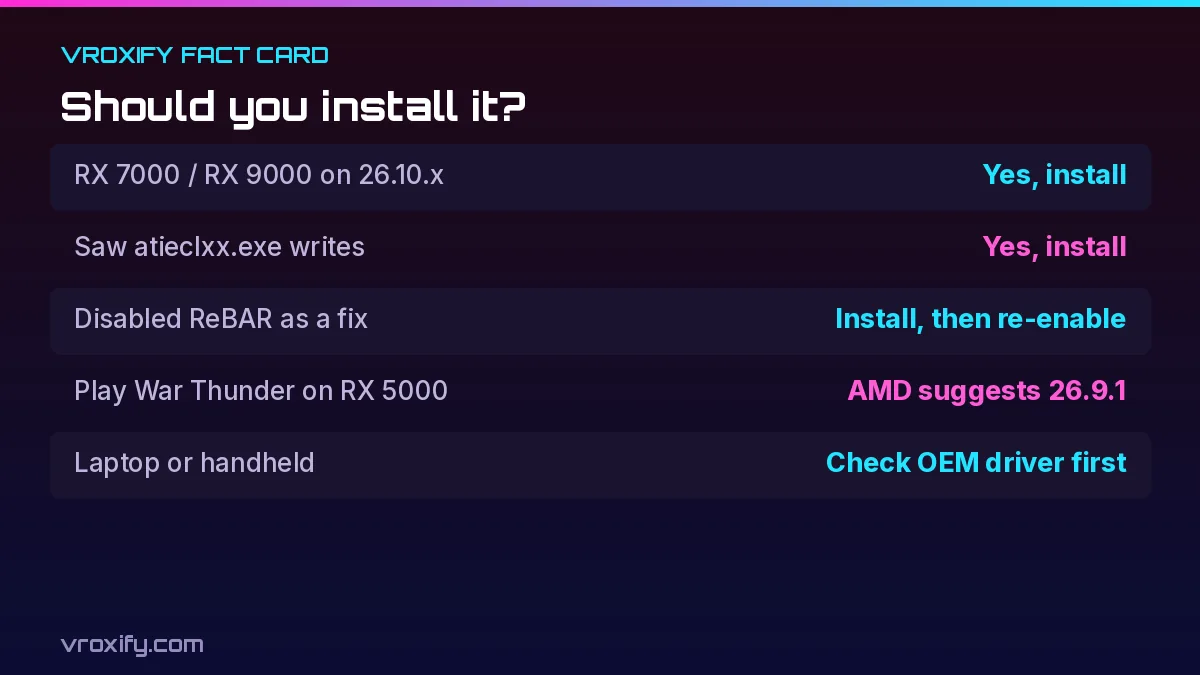
Undo these workarounds after updating
Before the fix arrived, affected users relied on stopgaps. VideoCardz and TechPowerUp both described the two most common ones, and neither worked for everyone. If you used either, reverse it after installing AMD Adrenalin 26.11.1:
1. Re-enable the AMD External Events Utility service
Some players stopped the service in Windows Services. That can interfere with Radeon Software hotkeys and some display functions. To restore it:
- Press Win + R, type services.msc and press Enter.
- Find AMD External Events Utility.
- Set Startup type to Automatic and click Start.
2. Turn Resizable BAR back on
Others disabled Resizable BAR (AMD calls it Smart Access Memory) in the motherboard BIOS. That can cost performance in some games, so switch it back on. This matters even more because AMD lists a known issue where Smart Access Memory may become disabled after installing the driver on Windows 10. Check that it is still on in your motherboard BIOS (often listed as Re-Size BAR Support) and in AMD Software’s settings.
3. Remove community blocking tools
A community-made, open-source tool also appeared to block the writes. Now that there is an official fix, both VideoCardz and AMD’s guidance point towards using the driver instead. Follow that tool’s instructions to restore default settings before or after updating.
Known issues in AMD Adrenalin 26.11.1
Optional drivers come with known issues, and this one has a fairly long list. The ones most relevant to gamers are:
| Game or feature | Known issue | AMD’s suggestion |
|---|---|---|
| Assassin’s Creed Black Flag Resynced | Intermittent crash or driver timeout on RX 7000 | None listed yet |
| War Thunder | Intermittent driver timeout on RX 5000 | Use Adrenalin 26.9.1 |
| Cyberpunk 2077 | Crash or timeout with FSR, Anti-Lag and frame generation while video plays on a second screen (some RX 9000) | Disable in-game frame generation |
| Phantom Blade Zero | Hair corruption on RX 9000 | Turn off High-Quality Hair |
| Call of Duty: Modern Warfare Remastered | Black corruption on RX 9000 | None listed yet |
| Gears of War: Reloaded | Black screen at launch on Ryzen AI 9 400 | Switch to Windowed, then back to Fullscreen |
| Smart Access Memory | May be disabled after install on Windows 10 | Re-enable it manually |
If one of these games is your main game and you weren’t affected by the write bug, it can be sensible to wait for the next recommended driver.
Which Radeon cards and systems can use AMD Adrenalin 26.11.1?
According to AMD’s compatibility list, AMD Adrenalin 26.11.1 supports:
- Radeon RX 9070, 9060 and 9050 series
- Radeon RX 7900, 7800, 7700, 7650 and 7600 series
- Radeon RX 6000 series, from RX 6400 to RX 6900
- Radeon RX 5000 series
- Radeon PRO and AI PRO workstation cards listed in the notes
- Ryzen processors with Radeon graphics, desktop and mobile
It runs on Windows 11 version 21H2 and later and Windows 10 64-bit version 21H2 and later. Note that the idle write fix specifically mentions RX 7000 and newer, and AMD’s support article lists RX 7000 and RX 9000. It isn’t clear whether older cards were ever affected.
Laptops and handhelds
AMD recommends that laptop and all-in-one owners use drivers from their PC maker where possible, because those are customised for the system. AMD also says Adrenalin doesn’t support handheld gaming devices, so owners of handhelds such as the ROG Xbox Ally family should get drivers from the manufacturer. Our ROG Xbox Ally X20 guide covers that handheld in detail.
Good driver habits for Radeon owners
This episode is a useful reminder of a few simple habits that keep a gaming PC healthy:
- Read the release notes. AMD’s notes list both fixes and known issues. Two minutes of reading tells you whether a driver helps or hurts the games you play.
- Know the difference between optional and recommended. Optional drivers arrive faster with fixes and game support; recommended (WHQL) drivers have had longer testing. If your PC works well and you aren’t affected by a bug, there’s no rush.
- Download only from AMD or your PC maker. Third-party driver sites can bundle unwanted software.
- Keep a known-good installer. Saving the installer for a driver that worked well makes rolling back quick if a new one causes trouble.
- Check your SSD’s health a few times a year. Your drive maker’s tool shows health and total writes, which can reveal problems like this one early.
What it means for PC gamers
For Radeon owners, this is a story with a good ending. AMD confirmed the problem publicly earlier in the week, named the cause, and shipped a fix within days. VideoCardz reported that an AMD representative linked it to an interaction between the External Events Utility and Microsoft’s PCIe filter driver, which helps explain why only some PCs were affected.
The bigger lesson is about monitoring. A bug like this doesn’t show up in frame rates, temperatures or benchmarks. Taking a quick look at Resource Monitor now and then is a good habit, especially if your PC stays on for long periods.
Our take
We’d install AMD Adrenalin 26.11.1 if you own an RX 7000 or RX 9000 card and are on a 26.10 driver, even if you never checked for the bug. The only reason to wait is if one of the games on the known-issues list is what you play most.
It also matters for upgrade planning. With graphics card and SSD prices high this year, keeping your current hardware healthy is worth more than ever. If you are still thinking about a new card, our best graphics card for 1440p guide and our budget gaming PC build explain where your money goes furthest. You can find more news like this in our PC & Hardware section.
FAQ
What is AMD Adrenalin 26.11.1?
It is an optional AMD Radeon graphics driver released on 12 November 2026. Its main job is to fix excessive writes to the system drive caused by the atieclxx.exe process on some PCs.
What is atieclxx.exe and is it a virus?
atieclxx.exe is AMD’s External Events Client Module, a genuine part of Radeon drivers that handles display and hotkey events. It is not malware. In drivers 26.10.1 and 26.10.2 it could get stuck writing to the drive on some systems.
Which Radeon cards had the SSD write bug?
AMD’s release notes say the idle write issue affected Radeon RX 7000 series graphics and newer, and AMD’s support article lists RX 7000 and RX 9000 series cards. Not every PC with those cards showed the problem.
Did the bug damage my SSD?
Probably not in any way you’ll notice. It added extra writes, which use up some of an SSD’s endurance rating. Reported rates ranged from 0.3 to 5 MB/s, and the real impact on drive lifespan hasn’t been established. Check Total Host Writes against your drive’s TBW rating if you’re worried.
Do I need to install AMD Adrenalin 26.11.1 if I wasn’t affected?
It isn’t essential, but it is sensible if you are on driver 26.10.1 or 26.10.2 with an RX 7000 or RX 9000 card. If you mainly play a game on the known-issues list, you could wait for the next recommended driver.
Should I turn Resizable BAR back on after updating?
Yes. If you turned off Resizable BAR or Smart Access Memory as a workaround, switch it back on after updating. AMD also warns that Smart Access Memory may be disabled after installing on Windows 10, so check it either way.
Is AMD Adrenalin 26.11.1 available for handheld PCs?
AMD says Adrenalin doesn’t support handheld gaming devices, so handheld owners should use drivers from the device maker. Laptop owners are advised to prefer drivers from their PC manufacturer too.
How do I check which Radeon driver version I have?
Open AMD Software: Adrenalin Edition and look in the System section, which shows the installed software and driver version. You can also right-click the desktop, open AMD Software, and check the version shown there. If it reads 26.10.1 or 26.10.2 and you own an RX 7000 or RX 9000 card, updating to 26.11.1 is the simplest way to rule out the write bug.
Sources
- AMD (12 Nov 2026): Adrenalin Edition 26.11.1 optional driver release notes
- AMD Support PA-365: Adrenalin Edition SSD write issue
- TechPowerUp: AMD patches Radeon SSD write bug in Adrenalin 26.11.1
- TechPowerUp: AMD confirms excessive SSD writes in Radeon drivers
- VideoCardz (9 Nov 2026): AMD confirms Radeon driver bug causing constant SSD writes
- VideoCardz (12 Nov 2026): AMD releases optional driver to fix excessive system drive writes
Checked on 14 November 2026. Write-rate figures are user reports and our own arithmetic, not AMD measurements. Vroxify is not affiliated with AMD. Artwork is original and shows no real product.
Related articles
Intel Core Ultra 7 260K: Specs Now Official, 260K vs 265K vs 270K Plus, and Should You Buy One?
Intel Core Ultra 7 260K explained: the official specs, why it is a slightly slower 265K, how it compares with the cheaper 270K Plus, the two ABS prebuilt PCs it ships in, and our buying advice for gamers.
Best PS5 SSD for GTA 6: Requirements, Top Picks and How to Install One
Our evergreen guide to the best PS5 SSD for GTA 6 and beyond: Sony's official requirements, five reliable drives, which capacity to choose, heatsink rules and a simple installation walkthrough.

Jensen Huang Resigns as NVIDIA CEO: What It Means for GeForce Gamers
Jensen Huang has resigned as NVIDIA's CEO. After the 17 November results, revenue is $115.8 billion and the board says it does not intend to reinstate him. We explain what is confirmed for GeForce cards, drivers and prices.