Gears of War E-Day SSD Test: Why NVMe Saves 2GB of RAM and When SATA Hurts
New testing shows The Coalition's shooter treats a fast NVMe drive like spare memory. Here's what the numbers mean, who should move their install, and what it says about PC gaming with 16GB of RAM.

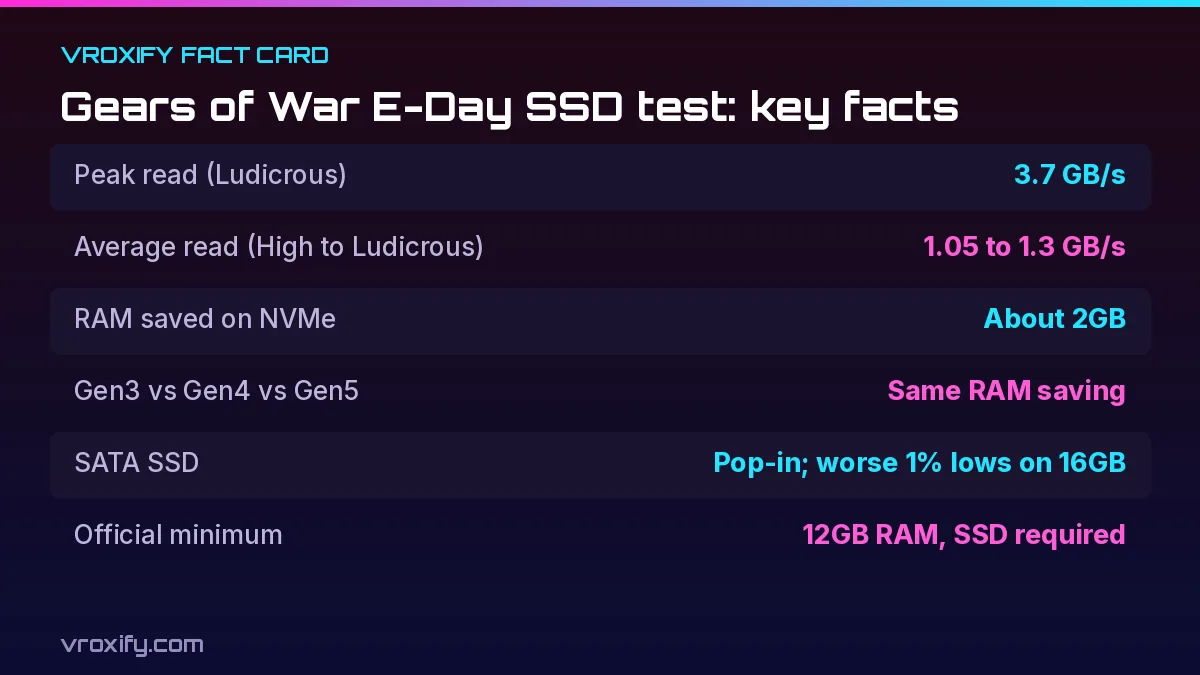
The Gears of War E-Day SSD results are in, and they settle a question many PC players have been asking since launch: does it matter which drive you install the game on? According to testing published by Tom’s Hardware on 14 November, it matters a lot. At higher settings, the game reads a steady 1 GB/s or more from storage, with peaks of 3.7 GB/s, and installing it on any NVMe SSD cuts system RAM use by roughly 2GB.
On a PC with 16GB of RAM, that means smoother 1% lows on NVMe than on a SATA SSD. On SATA, textures, lighting and shadows can load in late. The short answer: if you play Gears of War: E-Day on PC, put it on an NVMe drive.
 SHORT
Key facts
- Test: Tom’s Hardware, published 14 November 2026, logging drive reads every 20 ms in HWiNFO at 4K with DLSS Quality
- Read rates: up to 3.7 GB/s peak and 1.3 GB/s average on the Ludicrous preset
- RAM saving: about 2GB on any NVMe SSD, from PCIe 3.0 to PCIe 5.0
- SATA SSD: slower texture, lighting and shadow loading; worse 1% lows on a 16GB laptop
- Official PC specs: 12GB RAM minimum, 16GB recommended, SSD required, 115GB of space (Steam)
- Released: 6 October 2026 on Xbox Series X|S, Xbox on PC and Steam (Xbox Wire)
What the Gears of War E-Day SSD test found
Tom’s Hardware ran the game on a high-end desktop and a mid-range gaming laptop. Hardware Busters, which summarised the testing the same day, lists the desktop as a Ryzen 7 9800X3D with an RTX 5090 and 64GB of DDR5, and the laptop as a Core i7-13620H with an RTX 4060 Laptop GPU and 16GB of DDR5.
The desktop measured how hard the game uses the drive at each graphics preset:
| Preset (4K, DLSS Quality) | Peak read | Average read |
|---|---|---|
| Ludicrous | 3.7 GB/s | 1.3 GB/s |
| Ultra | 2.8 GB/s | 1.2 GB/s |
| High | 2.5 GB/s | 1.05 GB/s |
| Medium | 1.5 GB/s | about 824 MB/s |
| Low | 858 MB/s | about 359 MB/s |
Tom’s Hardware’s table lists the Medium and Low averages with a “GB/s” unit, which looks like a typo given the peaks; we show them as MB/s.
The average figure is the important one. Short spikes are common in many games, but a sustained average above 1 GB/s means the drive is doing constant work. Tom’s Hardware says the highest sustained average it had recorded before was 366 MB/s, in Forspoken at maximum settings, and many games stay under 100 MB/s.
The RAM saving
The headline Gears of War E-Day SSD finding is about memory. With the game on an NVMe SSD, the desktop used about 2GB less system memory than with a SATA install. The saving was the same on PCIe 3.0, 4.0 and 5.0 NVMe drives. You don’t need the newest, most expensive SSD to benefit, just any NVMe drive.
The 16GB laptop result
This is where the Gears of War E-Day SSD findings matter most. On the 16GB laptop, average frame rates were almost identical on NVMe and SATA. But as the preset went up, the 1% lows were better on NVMe, which means fewer dips and smoother frame pacing. On the 64GB desktop, a SATA install had no measurable performance cost; it simply looked worse while assets caught up.
How the Gears of War E-Day SSD streaming tech works
The technique started on console. In an interview with Digital Foundry, cited by Tom’s Hardware, developer The Coalition explained that it uses the Xbox Series S’s fast SSD as an extension of system memory. The game loads and unloads chunks of its dense city just before each scene needs them, so it can fit a detailed world into the Series S’s limited RAM.
The clever part isn’t paging data to disk, which Windows has done for decades. It’s deciding what to fetch and when. Digital Foundry describes careful heuristics so that swapping only happens when it helps, rather than causing stutter. The PC version clearly uses the same approach.
The game also supports DirectStorage, Microsoft’s faster loading API. But Tom’s Hardware notes that DirectStorage on its own hasn’t produced read rates like this in its earlier tests. The difference here is how the game is designed around constant streaming.
Where the story started
The testing followed a post by YouTuber Mostly Positive Reviews, who saw unusual drive activity on a Core i5-14400F system with 16GB of RAM. He reported 16GB maxed out, constant disk reads around 120 MB/s with spikes to 500 MB/s, and shader compilation stutters. Because Task Manager polls too slowly to catch short bursts, Tom’s Hardware switched to HWiNFO at 20 ms intervals to measure properly.
NVMe vs SATA: why the interface matters here
The Gears of War E-Day SSD numbers only make sense next to what each drive can do. To see why SATA struggles, compare the game’s demands with what each type of drive can deliver. These are typical sequential read limits, not exact figures for every model:
| Drive type | Typical max sequential read | Keeps up with E-Day’s 1 GB/s+ average? |
|---|---|---|
| Hard drive (HDD) | about 0.2 GB/s | No, and an SSD is required anyway |
| SATA SSD | about 0.55 GB/s | No, at High and above |
| NVMe PCIe 3.0 | up to about 3.5 GB/s | Yes |
| NVMe PCIe 4.0 | up to about 7 GB/s | Yes |
| NVMe PCIe 5.0 | up to about 14 GB/s | Yes |
A SATA SSD tops out around half a gigabyte per second because of the SATA interface itself, so it can’t sustain the 1 GB/s-plus averages the game asks for at High, Ultra and Ludicrous. That matches what Tom’s Hardware saw: late textures, slow lighting and shadows. So in any NVMe vs SATA comparison for this game, even an older PCIe 3.0 drive has plenty of headroom.
Official Gears of War E-Day PC requirements
The Steam store page lists these specs. Note that an SSD is required at both levels:
| Minimum | Recommended | |
|---|---|---|
| OS | Windows 10 64-bit (22H2) | Windows 11 64-bit (25H2) or newer |
| CPU | Ryzen 5 2600X / Core i7-6850K / Core i5-10400 | Ryzen 5 5600 / Core i5-11600K |
| RAM | 12GB | 16GB |
| GPU (ray tracing required) | RTX 5050 / RTX 2060 / RX 6600 / RX 9060 | RTX 5060 / RTX 3060 Ti / RX 6700 XT / RX 9060 XT |
| Storage | 115GB, SSD required | 115GB, SSD required |
Those RAM figures are lower than you might expect for a game this detailed. The Gears of War E-Day SSD streaming is a big reason why: the game leans on fast storage so it doesn’t need as much memory.
What it means for you
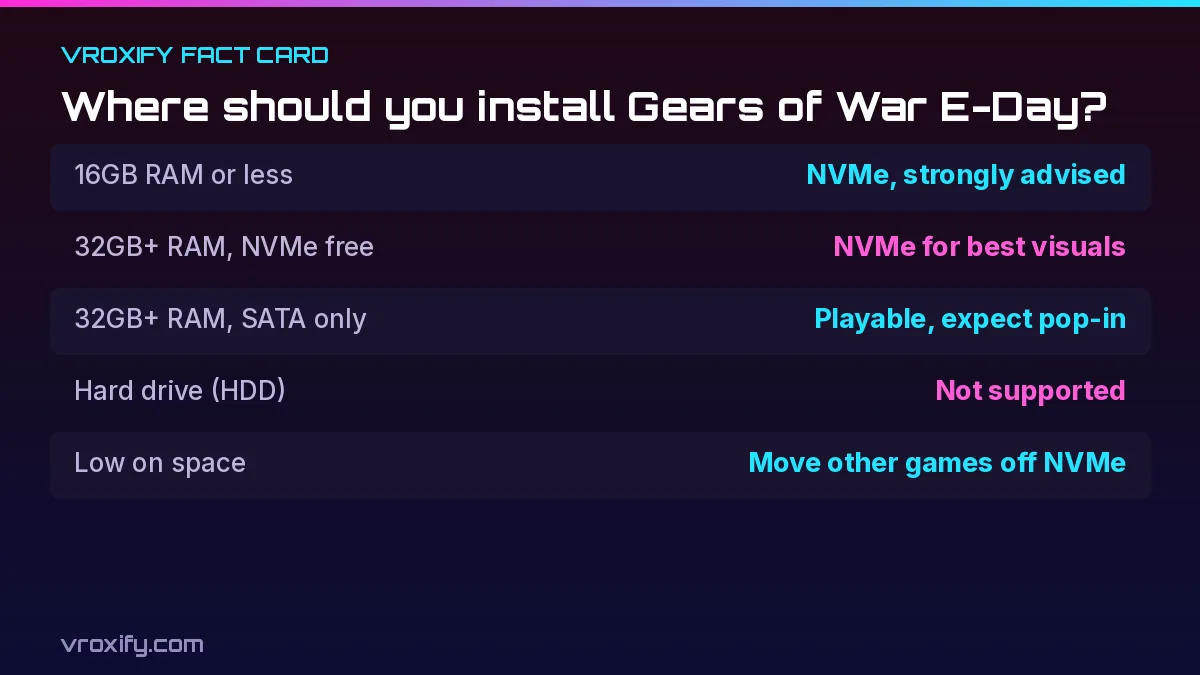
If you have 16GB of RAM or less
Install the game on an NVMe SSD. This is where the difference shows up in frame pacing, not just image quality. Close browsers and other heavy apps while playing, too, since every gigabyte counts.
If you have 32GB or more
NVMe vs SATA matters less for you. You’ll be fine on either drive in terms of frame rate, but NVMe still gives you sharper textures and cleaner lighting sooner. If your NVMe drive has 115GB free, use it.
If you only have a SATA SSD
This is where the NVMe vs SATA gap is felt most. The game will run, but expect pop-in, especially at High and above. Dropping to Medium or Low reduces the read rate a lot, which helps. A 1TB NVMe drive is one of the cheapest upgrades that makes a visible difference here, as long as your motherboard or laptop has a free M.2 slot.
How to check which drive you have
Before acting on the Gears of War E-Day SSD advice, check what’s in your PC:
- Open Task Manager and go to the Performance tab.
- Click each Disk. Windows shows the type as SSD (NVMe), SSD (usually SATA) or HDD.
- To move the game, use the Xbox app’s Manage > Files > Move option, or Steam’s Storage settings and Move button, depending on where you bought it.
Best settings for 16GB PCs and laptops
The Gears of War E-Day SSD data also suggests a sensible way to tune the game on a mid-range machine. The streaming load drops sharply as you lower the preset, so you have more control than you might think:
| Preset | Average read (Tom’s Hardware) | Good fit for |
|---|---|---|
| Ludicrous / Ultra | 1.2 to 1.3 GB/s | 32GB+ RAM, PCIe 4.0 NVMe |
| High | about 1.05 GB/s | 16GB RAM with NVMe |
| Medium | about 824 MB/s | 16GB RAM on SATA, or older laptops |
| Low | about 359 MB/s | 8GB to 12GB systems, SATA drives |
Our suggestions, based on that table and the NVMe vs SATA results:
- Start at High on NVMe with 16GB. The laptop test suggests this is where NVMe’s smoother 1% lows pay off.
- Use Medium on SATA. Its average read rate is still above what SATA can sustain, but much closer, so pop-in is less severe.
- Keep upscaling on. Tom’s Hardware tested with DLSS Quality at 4K. Upscaling lowers the GPU load without changing how much the game streams.
- Leave free space on the drive. SSDs slow down when nearly full, so try to keep 10 to 15 percent free.
- Let shaders finish compiling. The early reports of stutter also mentioned shader compilation, which is a separate issue from storage.
Gaming laptops: a special case
Laptops are where the NVMe vs SATA question is most real, because many have 16GB of RAM that can’t be upgraded. The good news is that almost every gaming laptop from the last few years ships with an NVMe drive. If yours has a second M.2 slot, adding a 1TB or 2TB NVMe drive for games is often easier and cheaper than replacing soldered memory. Check your laptop’s manual before buying, since some second slots are limited to slower PCIe lanes, which is still far faster than SATA.
Will all this reading wear out my SSD?
No. The Gears of War E-Day SSD streaming is almost all reads. SSD wear comes mainly from writes, not reads. Endurance ratings such as TBW (terabytes written) count data written to the drive. A game that streams assets in is reading, which has very little effect on lifespan. That’s the opposite of the recent Radeon driver bug, which caused unwanted writes; our AMD Adrenalin 26.11.1 guide explains that case.
Heat is the one thing to keep an eye on. Sustained reads can warm up fast PCIe 4.0 and 5.0 drives, so a heatsink or motherboard M.2 cover is a good idea in small cases.
Console vs PC: why Xbox players don’t need to worry
On Xbox Series X|S, the Gears of War E-Day SSD streaming was built around one known drive, so every console gets the same experience. That’s exactly what The Coalition designed for on Series S. PC is different, because players use everything from hard drives to PCIe 5.0 SSDs, and RAM ranges from 8GB to 64GB or more.
That is why the NVMe vs SATA question only really exists on PC. The game scales its memory use to what your system has, and it expects a fast drive to fill the gap. If you have Game Pass and play on both, there’s nothing to change on console. On PC, the drive you choose decides how close you get to the console’s smooth streaming.
Does the Xbox expansion card count?
Yes. Xbox’s official Storage Expansion Cards are designed to match the internal SSD’s performance, so installing the game on one shouldn’t change anything. Older USB drives are a different story and aren’t suitable for playing current-generation Xbox games.
The bigger picture: fast storage vs pricey RAM
Memory prices have been high all year, and 16GB is still the most common amount in gaming PCs. Plenty of laptops ship with 16GB soldered on, and some budget machines still have 8GB. A game that can lean on a cheap NVMe drive to make up for missing memory is a practical answer to that.
Tom’s Hardware raises the obvious question: will other studios follow? Done well, as The Coalition appears to have done, it lets detailed worlds run on modest PCs. Done badly, it would simply move stutter from RAM to storage. Either way, the Gears of War E-Day SSD results are a strong signal that an NVMe drive is now a baseline for modern PC games, not a luxury.
Our take
For anyone building or upgrading a PC this winter, this changes priorities a little. If you’re torn between more RAM and a better SSD, a decent 1TB or 2TB PCIe 4.0 NVMe drive and 32GB of RAM remains the sweet spot. But if budget forces a choice and you’re stuck on SATA, the drive upgrade may now do more for some new games than you’d think. Our budget gaming PC build shows how to balance both during the RAM shortage, and our best graphics card for 1440p guide covers the GPU side. Console owners weighing storage can read our best PS5 SSD guide. More hardware coverage is in PC & Hardware.
FAQ
Does the Gears of War E-Day SSD requirement mean I need NVMe?
The official specs require an SSD, not specifically NVMe. But testing shows an NVMe SSD saves about 2GB of RAM and avoids late-loading textures. On 16GB PCs it also gives smoother 1% lows, so NVMe is strongly recommended.
How fast does Gears of War E-Day read from the SSD?
In Tom’s Hardware’s Gears of War E-Day SSD test, the game averaged 1.05 to 1.3 GB/s at High, Ultra and Ludicrous at 4K with DLSS Quality, with peaks of up to 3.7 GB/s.
Is a PCIe 5.0 SSD better for Gears of War E-Day?
Not in a meaningful way, according to the Gears of War E-Day SSD test. The RAM saving was the same on PCIe 3.0, 4.0 and 5.0 NVMe drives. Any NVMe SSD with enough space is fine.
Can I play Gears of War E-Day on a SATA SSD?
Yes. In NVMe vs SATA terms, it still runs, but textures, lighting and shadows can appear late. On a 16GB laptop, 1% lows were worse than on NVMe at higher presets. Lowering the preset reduces the problem.
How much RAM does Gears of War E-Day need?
This is where NVMe vs SATA ties in. Steam lists 12GB as the minimum and 16GB as recommended. Installing on NVMe reduces memory use by about 2GB, which helps on 16GB systems.
Will constant streaming damage my SSD?
No. SSD wear is driven by writes, and streaming game assets is mostly reading. Keep an eye on drive temperatures in small cases, but lifespan isn’t a concern here.
Does DirectStorage explain the high read speeds?
Only partly. The game supports DirectStorage, but Tom’s Hardware says DirectStorage alone hasn’t produced reads like this in its other tests. The Coalition’s streaming system, which treats the SSD as extra memory, is the main reason.
Sources
- Tom’s Hardware (14 Nov 2026): We tested the RAM-saving storage tech in Gears of War: E-Day
- Hardware Busters (14 Nov 2026): Gears of War: E-Day streams over 1 GB/s from the SSD nonstop
- Xbox Wire (17 Sep 2026): Gears of War: E-Day has gone gold, full PC specifications revealed
- Steam: Gears of War: E-Day store page and system requirements
Checked on 15 November 2026. Benchmark figures are from Tom’s Hardware’s testing; drive interface speeds are typical ranges, not measurements. Vroxify is not affiliated with Microsoft, Xbox or The Coalition. Artwork is original and shows no real product or in-game content.
Related articles
Intel Core Ultra 7 260K: Specs Now Official, 260K vs 265K vs 270K Plus, and Should You Buy One?
Intel Core Ultra 7 260K explained: the official specs, why it is a slightly slower 265K, how it compares with the cheaper 270K Plus, the two ABS prebuilt PCs it ships in, and our buying advice for gamers.
Best PS5 SSD for GTA 6: Requirements, Top Picks and How to Install One
Our evergreen guide to the best PS5 SSD for GTA 6 and beyond: Sony's official requirements, five reliable drives, which capacity to choose, heatsink rules and a simple installation walkthrough.

Jensen Huang Resigns as NVIDIA CEO: What It Means for GeForce Gamers
Jensen Huang has resigned as NVIDIA's CEO. After the 17 November results, revenue is $115.8 billion and the board says it does not intend to reinstate him. We explain what is confirmed for GeForce cards, drivers and prices.