GTA 6 Launch Checklist: Pre-Load, 212 GB Storage, Unlock Times and Editions
Grand Theft Auto VI launches on 19 November 2026. Here is the night-before list, built only from what Rockstar, PlayStation and Xbox have published.
Grand Theft Auto VI is days away. Rockstar Games and Take-Two Interactive have confirmed a 19 November 2026 launch on PlayStation 5, PS5 Pro and Xbox Series X|S, and the pre-load is already running. This guide pulls together everything you need to sort out before launch night: storage, unlock times, editions, prices and the bonus deadlines that are easy to miss. Every claim links to Rockstar, PlayStation, Xbox, or a named outlet. There are no leaks and no rumour calendars here.
Use this GTA 6 launch checklist from top to bottom: it is ordered so the slow jobs (download, storage, code redemption) come first and the quick decisions (edition, bonuses) come last.
 VIDEO
Key facts
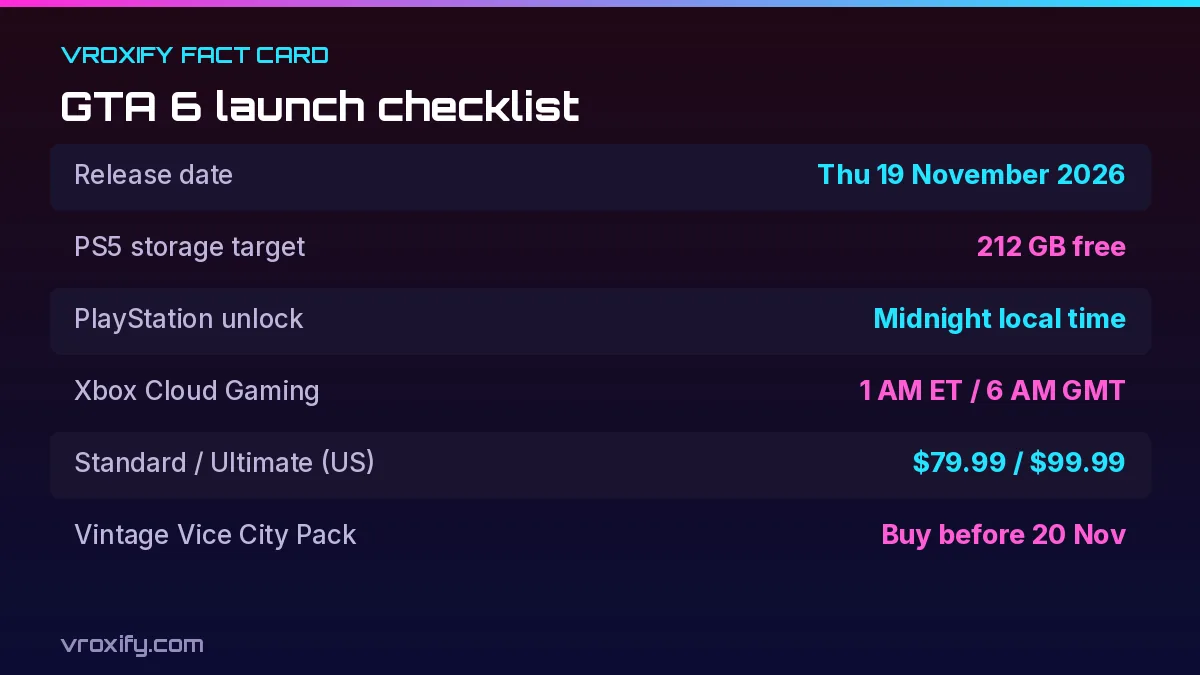
- Release date: Thursday 19 November 2026 (Rockstar Newswire)
- Platforms: PS5, PS5 Pro (Enhanced) and Xbox Series X|S. Xbox One can stream it through Xbox Cloud Gaming.
- Storage: clear at least 212 GB on PS5 (PlayStation)
- Prices (US): Standard $79.99, Ultimate $99.99 (Take-Two)
- Pre-load: live since 10 November
- Bonus deadline: buy before 20 November to get the Vintage Vice City Pack
When does GTA 6 unlock?
On PlayStation, the game unlocks at midnight local time on 19 November. The PlayStation Blog calls it a rolling launch by country. It starts at 12:00 AM in New Zealand and moves around the world as each country reaches midnight. In the UK that means midnight GMT going into Thursday. In Australia, it follows your own state’s local midnight.
Xbox Cloud Gaming follows a different clock. Xbox Wire says cloud streaming starts at 1 AM Eastern Time on 19 November, which is 6 AM GMT. For Xbox Series consoles playing an installed copy, the store date is 19 November. Rockstar has not published a time-zone table for the US or Canada, so if you live somewhere with more than one time zone, trust the countdown on your own PlayStation Store or Microsoft Store page over clocks shared on social media.
Pre-load: start it tonight
Pre-load opened on 10 November 2026. That is earlier than the 12 November date in Take-Two’s June announcement. Rockstar Support says digital pre-load on PS5 began at midnight local time, and on Xbox Series X|S it began worldwide at 12 AM GMT. In the Americas, that was the evening of 9 November.
How much space does GTA 6 need?
PlayStation’s product page tells you to clear a minimum of 212 GB on your PS5. The Verge, quoting Rockstar, reported you may need up to 212 GB depending on the device. Plan for the full figure. If your console is close to full, an M.2 SSD expansion on PS5 or a storage expansion card on Xbox Series X|S is the cleanest fix. Uninstalling a couple of large games you have finished works too.
PlayStation’s support checklist is short and worth following:
- Turn on auto-install in Rest Mode.
- Keep your console connected to the internet in Rest Mode.
- Update your system software before launch night.
- Make sure you are signed in to the account that bought the game.
Bought a physical copy? There is no disc
This catches a lot of people out. Rockstar and PlayStation say the retail box contains a download code, not a disc. Retail copies have been on sale since 12 November. Redeem the code as soon as you open the box so the pre-load can start. Rockstar also warns that PlayStation codes are tied to the region of your account, so buy from a retailer in the same country or region. Xbox codes are not region-locked, according to the same support page.
 SHORT
Standard or Ultimate: which edition should you buy?
Take-Two set the US prices at $79.99 for the Standard Edition and $99.99 for the Ultimate Edition. Standard is the full game, and you do not need Ultimate to play the story.
The Ultimate Edition is digital only. Rockstar Support lists what the extra $20 buys: exclusive vehicles, weapons, apparel and story-threaded bonuses, plus locations that only open in that edition, including shops, a salon, a tattoo parlour and custom garages. If you start with Standard, Rockstar says you can buy the Ultimate upgrade later from the PlayStation Store or Microsoft Store once your copy is redeemed. That makes it a low-risk decision: start with Standard and upgrade if you want more.
The Vintage Vice City Pack deadline is 20 November
Purchases made before 20 November include the Vintage Vice City Pack. That deadline is the day after launch, not launch night, so there is still a short window. Rockstar’s official pack list includes:
- a 1955 Vapid Stanier sedan and a garage
- outfits and hairstyles
- an exclusive weapon pattern
Digital editions also include one free month of GTA+. The physical code-in-box version includes the pack but not the GTA+ month. On PlayStation, the free month is not applied automatically. You have to claim it on the GTA+ page by 31 March 2027, and PlayStation’s store copy says to check the date your paid subscription would begin so you can cancel if you do not want it to renew.
Who can actually play on day one?
Native play is limited to PS5, PS5 Pro and Xbox Series X|S. PlayStation says the game is not playable on PS4. Xbox One owners can stream it on day one through Xbox Cloud Gaming, but GTA 6 is not part of Game Pass, so you still have to buy it. We cover the details, including PC and Switch 2, in our day-one platform guide.
GTA 6 launches as a single-player game. A later online mode is widely expected but has not been dated. The ESRB rates it M for Mature 17+, with in-game purchases.
On performance, Rockstar has said the game targets 30 frames per second on all current consoles, including PS5 Pro. We explain what that means in GTA 6 runs at 30 FPS even on PS5 Pro.
How long will the GTA 6 pre-load take?
The honest answer depends on your connection, not your console. A 212 GB download is big, so it helps to do the maths before launch night instead of hoping it finishes by midnight. The figures below are simple arithmetic (download size divided by line speed), not Rockstar estimates, and real downloads are usually a little slower because of server load and Wi-Fi overhead.
| Real download speed | Approximate time for 212 GB |
|---|---|
| 50 Mbps | about 9.5 hours |
| 100 Mbps | about 4.7 hours |
| 300 Mbps | about 1.6 hours |
| 500 Mbps | about 57 minutes |
| 1 Gbps | about 28 minutes |
If you are on the slower end, start the GTA 6 pre-load as early as you can and leave the console in Rest Mode overnight. A wired Ethernet cable is the single biggest speed-up for most homes, because consoles placed inside TV cabinets often get weak Wi-Fi. Pausing other large downloads on the same network (PC game updates, cloud backups, 4K streams) also helps.
Make room without losing your saves
Deleting a game on PS5 or Xbox Series X|S does not delete its save data. On PS5, saves stay in console storage and sync to PS Plus cloud storage if you subscribe. On Xbox, saves sync to the cloud automatically for most games. That makes it safe to clear out finished games to reach the 212 GB target. If you would rather keep everything, our budget PC and hardware guides explain what to look for in fast storage, and PS5 owners can add a compatible M.2 SSD in a few minutes.
Common launch-night problems and quick fixes
Big launches rarely go perfectly, so here are the issues we expect most players to hit, with the fix that usually works. None of these are confirmed GTA 6 bugs; they are the standard problems that show up whenever a huge game unlocks at the same time worldwide.
- The game says “pre-ordered” but will not start. The unlock is controlled by the store, not your download. Wait for your local midnight on PlayStation and check that your console clock is set automatically.
- The download is stuck at a percentage. Pause and resume it from the downloads list, or restart the console. Do not delete the game, or you will start the whole 212 GB again.
- A retail code will not redeem. Check the region of your PlayStation account first. Rockstar Support says PlayStation codes are region-locked.
- Xbox Cloud Gaming has a queue. Cloud servers fill up on launch night. Waiting it out is the only fix, and a wired connection gives a better picture once you are in.
- Missing Vintage Vice City Pack items. Bonus items usually arrive in-game after you reach a set point in the story. Check Rockstar Support before contacting the store.
Best TV and console settings for launch night
GTA 6 targets 30 frames per second on every console, so a few minutes in your settings menus will make a bigger difference than usual. These are general display tips, not Rockstar instructions, and they work for any 30 FPS game.
- Turn on your TV’s Game Mode. It cuts input lag, which matters more at 30 FPS because each frame is on screen for longer.
- Enable HDR only if your TV handles it well. Run the PS5 or Xbox HDR calibration tool first. A badly set HDR picture looks washed out or crushed in dark night scenes.
- Switch off motion smoothing on the TV. It adds lag and creates artefacts around fast-moving cars.
- Use the console’s 120 Hz or VRR options carefully. They are useful for other games but do not raise a fixed 30 FPS cap.
We explain the frame-rate situation in more depth in our GTA 6 30 FPS explainer, including what PS5 Pro owners get instead.
A family and budget sanity check
The ESRB rating is M for Mature 17+, with in-game purchases. If the console is shared with younger players, set up PlayStation Family or Xbox Family Settings before launch night so the age rating and spending limits are already in place. Both systems let a parent approve purchases, which is useful because the Ultimate upgrade and GTA+ can both be bought from inside the store.
On budget, the cheapest legitimate way to play on day one is the Standard Edition on a console you already own. Everything else, from the Ultimate upgrade to GTA+, is optional. Avoid sites selling cheap “GTA 6 keys” from unknown sellers: Rockstar Support warns that PlayStation codes are region-locked, and grey-market codes are a common source of refunds being refused.
Your GTA 6 launch checklist timeline
Here is how we would spread the jobs across launch week so nothing is left to the last hour:
- Five days out: check your free space against the 212 GB target and delete or move finished games.
- Four days out: start the GTA 6 pre-load, or redeem the code from a retail box and start it then.
- Three days out: update the console system software and confirm auto-install in Rest Mode is on.
- Two days out: decide between Standard and Ultimate, remembering the Vintage Vice City Pack deadline of 20 November.
- Launch eve: confirm the download is 100% complete, set your TV to Game Mode, and leave the console in Rest Mode.
- Launch morning: PS5 owners in the US and Canada can play from midnight local time; Xbox Cloud Gaming opens at 1 AM ET.
If something on this list changes, for example a new patch on day one, we will add it here with an “Updated” note so you always know what is new.
Should you wait for reviews before you buy?
There is no rush to buy the Ultimate Edition on day one. Standard gives you the full single-player game, and the Ultimate upgrade can be bought later. The only real day-one decision is the Vintage Vice City Pack, which needs a purchase before 20 November. If you are unsure, buying Standard before that date and waiting for reviews of the extra content is the cheapest low-risk path.
The night-before checklist
- You own the game on a platform that can play it on day one (PS5, PS5 Pro, Series X|S, or Xbox One via cloud).
- The pre-load is finished, or at least running, with 212 GB free.
- A physical box code is redeemed on the right account and region.
- You have chosen Standard or Ultimate, knowing you can upgrade later.
- If you want the Vintage Vice City Pack, you have bought it before 20 November.
- PlayStation owners have noted the 31 March 2027 deadline to claim the free GTA+ month.
Want company at midnight? The YouTube Blog says YouTube and Rockstar are running a 24-hour launch livestream starting at 12 AM ET on 19 November, with a pre-show at 11 PM ET on 18 November. It is a watch-along, so it won’t speed up your own download.
Still not confirmed
- PC version: no official date.
- Nintendo Switch 2: not announced.
- GTA 6 Online: not dated.
We will update this guide if Rockstar, PlayStation or Xbox change any of the details above.
FAQ
What is the most important step in the GTA 6 launch checklist?
Freeing up storage and starting the pre-load. PlayStation asks for at least 212 GB, and a download that size can take hours on a normal home connection, so it should be started days before 19 November.
What time does GTA 6 unlock?
On PS5 it unlocks at midnight local time on 19 November in each country. Xbox Cloud Gaming starts at 1 AM Eastern Time, which is 6 AM GMT.
Does the physical version of GTA 6 come with a disc?
No. Rockstar and PlayStation say the retail box contains a download code, so you still need the 212 GB of free space and an internet connection.
Can I upgrade from Standard to Ultimate later?
Yes. Rockstar Support says the Ultimate upgrade can be bought later from the PlayStation Store or Microsoft Store once your copy is redeemed.
Is GTA 6 on PS4, PC or Game Pass?
No. It is playable on PS5, PS5 Pro and Xbox Series X|S. Xbox One owners can stream it through Xbox Cloud Gaming, but it is not included in Game Pass. There is no PC date yet.
Will there be a day-one patch for GTA 6?
Rockstar has not published day-one patch notes. If one arrives, the console downloads it automatically when you start the game, so keep some spare space above the 212 GB target.
Sources
- Rockstar Newswire: GTA VI launches 19 November 2026
- Take-Two press release (24 June 2026): pre-orders, prices, Vintage Vice City Pack
- Rockstar Support: platforms, editions and versions
- PlayStation: Grand Theft Auto VI product page
- PlayStation Support: GTA VI launch help
- PlayStation Blog (10 Nov 2026): pre-load live, rolling midnight launch
- Xbox Wire (10 Nov 2026): GTA 6 on Xbox Cloud Gaming
- The Verge: GTA VI storage space
- ESRB rating: Grand Theft Auto VI
- YouTube Blog: GTA VI launch livestream
Facts checked on 14 November 2026. Vroxify is not affiliated with Rockstar Games or Take-Two Interactive. Artwork is original and illustrative.
Related articles
GTA 6 Hacker Arion Kurtaj Pleads Guilty: What He Admitted, When He Is Sentenced and What It Means for Rockstar
Arion Kurtaj, the GTA 6 hacker who leaked 90 clips in 2022, pleaded guilty on 16 November 2026 to hacking Rockstar, Uber, Revolut and BT/EE. What he admitted, the 23 November sentencing date and what it means for GTA 6.
GTA 6 Guardian Interview: 9 New Gameplay Details Rockstar Revealed Days Before Launch
Everything new from the Guardian's GTA 6 visit to Rockstar North: small-time crimes first, robbery scouting, relationship dates, free character switching, a 62-bird wildlife log, and the "empathy" mechanics, with our analysis.
PS5 vs PS5 Pro for GTA 6: Which Console Should You Buy Before Launch?
Our PS5 vs PS5 Pro guide for GTA 6: what Rockstar confirmed for each console, current prices in the US and UK, storage, the disc drive question, and which model is right for you.