Best Graphics Cards for 1080p and 1440p Gaming (November 2026)
Street prices are well above launch MSRPs in late 2026. Here's how to pick the right card for your resolution without overpaying.
Buying a graphics card in November 2026 is harder than it should be. The current generation, NVIDIA’s RTX 50 series and AMD’s Radeon RX 9000 series, has been out since early 2025. But street prices are far above the official launch prices for many models, and stock of the best-value cards comes and goes. This guide gives you clear picks for 1080p and 1440p, shows the official launch price (MSRP) for each card so you have a fixed reference point, and explains how to judge whether today’s price is worth paying.
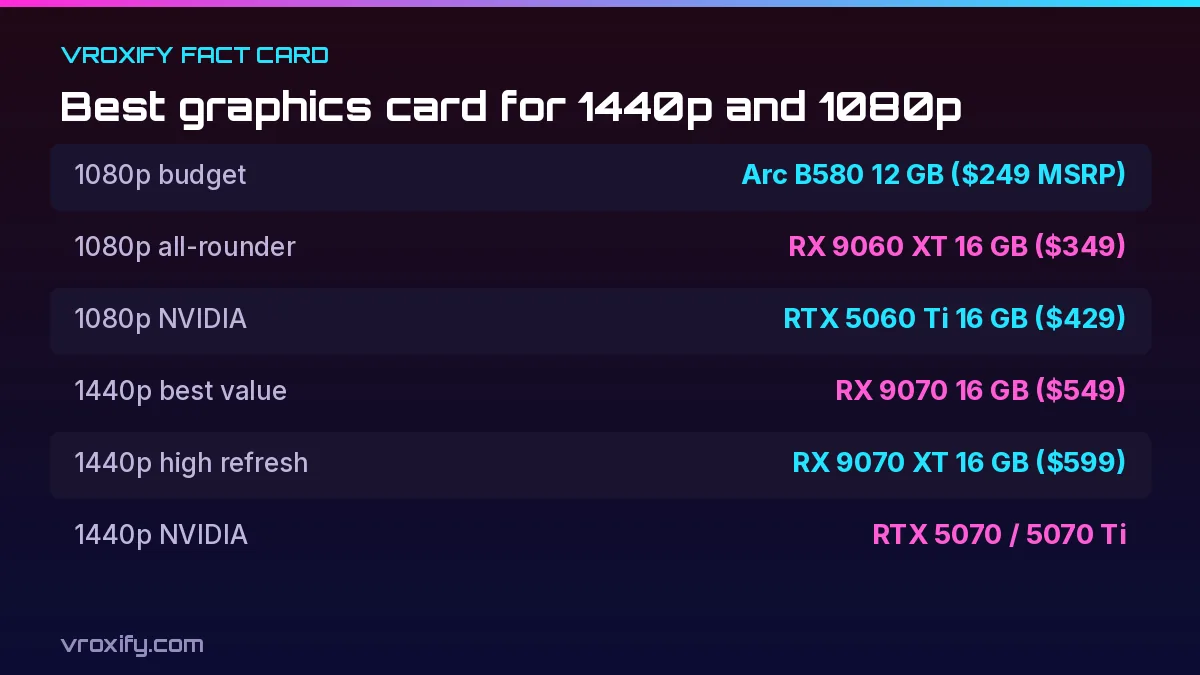
If you only want the short answer, the best graphics card for 1440p for most people is the Radeon RX 9070 at a fair price, with the RX 9070 XT for high-refresh monitors and the RTX 5070 Ti if you want NVIDIA’s features.
 SHORT
Our picks at a glance
| Use | Pick | VRAM | Launch price (MSRP) |
|---|---|---|---|
| 1080p, tight budget | Intel Arc B580 | 12 GB | $249 |
| 1080p, best all-rounder | Radeon RX 9060 XT 16 GB | 16 GB | $349 |
| 1080p / entry 1440p, NVIDIA | GeForce RTX 5060 Ti 16 GB | 16 GB | $429 |
| 1440p, best value | Radeon RX 9070 | 16 GB | $549 |
| 1440p, high refresh | Radeon RX 9070 XT | 16 GB | $599 |
| 1440p, NVIDIA features | GeForce RTX 5070 / 5070 Ti | 12 GB / 16 GB | $549 / $749 |
MSRPs are the official US launch prices from AMD, NVIDIA and Intel. Today’s retail prices are often higher; see “Street prices” below.
How we chose these picks
We want to be transparent about how this guide is built. Vroxify does not run its own GPU test lab, so we do not publish our own benchmark charts. Instead, the picks are based on three things:
- Official specifications and launch prices from AMD, NVIDIA and Intel, linked in the Sources box.
- Independent reviews and price trackers from established outlets, which we read and compare before recommending a card.
- Value at today’s prices, checked on the date shown at the bottom of this page.
We have no affiliate links on this page and no relationship with any GPU maker. If a pick changes because prices move or a new card launches, we update the guide and the date.
First, a reality check on prices
Prices have been distorted by a component shortage driven by demand from AI data centres. Memory has been hit hardest: Tom’s Hardware reported the cheapest 32 GB DDR5-6000 kit had reached about $450. Graphics cards have followed. PC Guide described RTX 5070s selling for around $800 against a $549 MSRP. A price tracker roundup from early November (Hardware & Games, prices checked 3 November) listed the cheapest in-stock RX 9070 XT at around $920 and RTX 5070 Ti listings from about $1,300.
So treat the MSRP column as a reference point, not a promise. Our rule of thumb: compare cards by price-per-performance on the day you buy, and don’t pay a big premium for one brand unless you need its specific features.
How much VRAM do you need?
Video memory (VRAM) matters more every year as open-world games load larger textures.
- 8 GB: workable at 1080p if you’re willing to lower texture settings. It’s the first thing to run out in big new games.
- 12 GB: comfortable for 1080p and fine for most 1440p games today.
- 16 GB: the safe choice for 1440p, and for keeping a card for several years.
Where a card comes in two memory versions, like the RTX 5060 Ti and RX 9060 XT, buy the 16 GB model if you can.
Best for 1080p
Intel Arc B580: the budget pick
Intel launched the Arc B580 at $249 with 12 GB of VRAM, more memory than most cards at its price (Intel). It’s a strong 1080p card for the money. Intel’s drivers have improved a lot, but older games can still be less consistent than on NVIDIA or AMD. It works best on a modern system with Resizable BAR enabled, so check your motherboard supports it.
Radeon RX 9060 XT 16 GB: the 1080p all-rounder
AMD’s RX 9060 XT launched at $349 for 16 GB and $299 for 8 GB (AMD). The 16 GB model is our 1080p recommendation because the extra memory keeps it comfortable in demanding open-world games, and it supports AMD’s FSR 4 upscaling. Avoid the 8 GB version unless the saving is large.
GeForce RTX 5060 Ti 16 GB: if you want NVIDIA
NVIDIA launched the RTX 5060 Ti at $429 (16 GB) and $379 (8 GB), and the RTX 5060 at $299 (NVIDIA). The 16 GB 5060 Ti gives you DLSS 4 with Multi Frame Generation and NVIDIA’s mature ray tracing. It’s a good 1080p card and can handle some 1440p gaming with upscaling. As with AMD, the 16 GB version is the one to buy.
Best for 1440p
Radeon RX 9070: best value for 1440p
The RX 9070 launched at $549 with 16 GB of GDDR6 and a 220 W board power (AMD). Independent testing compiled by price trackers in November put it slightly ahead of the RTX 5070 in traditional (rasterised) performance, with more memory. When you can find it close to its launch price, it’s the easiest 1440p recommendation. Stock has been patchy, so if it costs nearly as much as an RX 9070 XT, buy the XT.
Radeon RX 9070 XT: high-refresh 1440p
The RX 9070 XT launched at $599, also with 16 GB (304 W board power). AMD said at launch that it was about 40% faster on average than the previous RX 7900 GRE at 1440p. It’s the card to get if you have a 144 Hz or faster 1440p monitor and want high frame rates without leaning heavily on upscaling. Make sure your power supply is good quality and meets the wattage your chosen board partner recommends, since factory-overclocked models can draw more than the reference 304 W.
GeForce RTX 5070 and RTX 5070 Ti: for NVIDIA’s feature set
The RTX 5070 launched at $549 with 12 GB of GDDR7, and the RTX 5070 Ti at $749 with 16 GB. Choose NVIDIA if you specifically want DLSS 4 Multi Frame Generation, the strongest path-traced ray tracing performance, or NVIDIA’s streaming and creator tools. The RTX 5070’s 12 GB is enough for 1440p today but leaves less headroom. The 5070 Ti is the better long-term 1440p NVIDIA card, but in early November it was often listed far above MSRP.
Specs compared
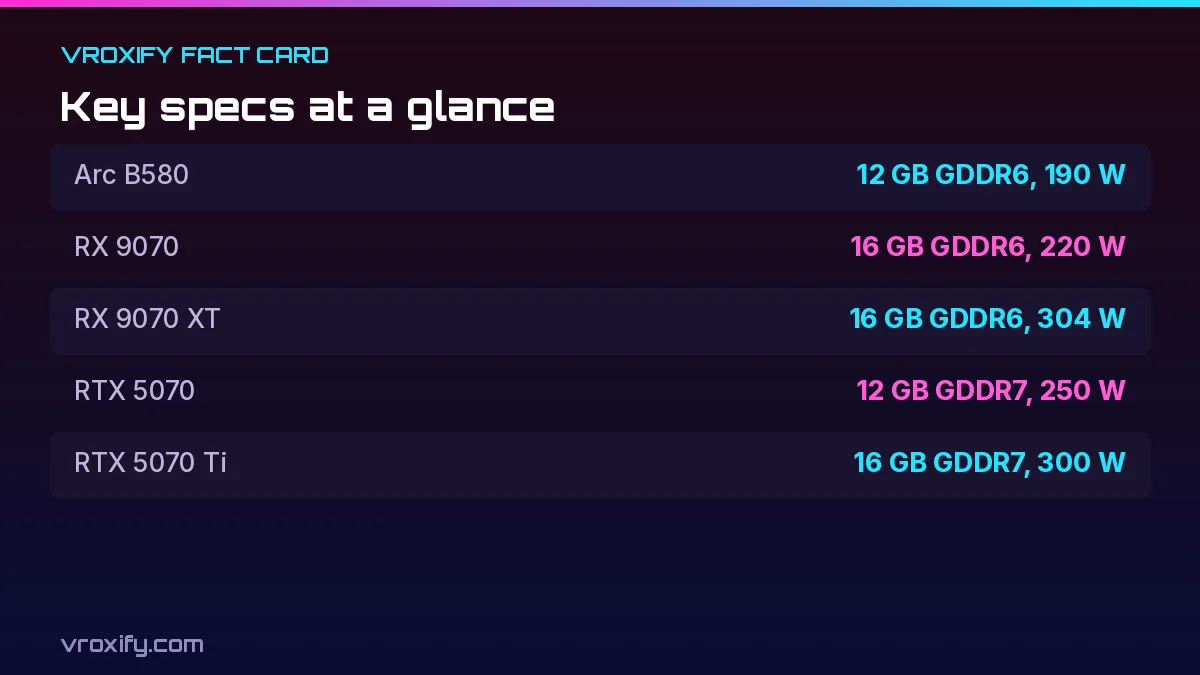
Power figures are the official total board power or graphics card power from AMD, NVIDIA and Intel. Partner cards with factory overclocks can draw more, so check the specific model.
| Card | VRAM | Memory type | Upscaling | Best for |
|---|---|---|---|---|
| Intel Arc B580 | 12 GB | GDDR6 | XeSS | 1080p on a budget |
| Radeon RX 9060 XT 16 GB | 16 GB | GDDR6 | FSR 4 | 1080p, entry 1440p |
| GeForce RTX 5060 Ti 16 GB | 16 GB | GDDR7 | DLSS 4 | 1080p with NVIDIA features |
| Radeon RX 9070 | 16 GB | GDDR6 | FSR 4 | 1440p value |
| Radeon RX 9070 XT | 16 GB | GDDR6 | FSR 4 | 1440p high refresh |
| GeForce RTX 5070 | 12 GB | GDDR7 | DLSS 4 | 1440p, NVIDIA features |
| GeForce RTX 5070 Ti | 16 GB | GDDR7 | DLSS 4 | 1440p long-term |
Upscaling explained: DLSS 4, FSR 4 and XeSS
All three companies now offer an upscaler that renders a game at a lower resolution and rebuilds a sharper image, which raises frame rates.
- NVIDIA DLSS 4 is available on RTX cards, and RTX 50 series cards add Multi Frame Generation, which inserts generated frames between rendered ones for much higher displayed frame rates. It works best when the base frame rate is already reasonable, because generated frames don’t reduce input lag.
- AMD FSR 4 uses machine learning on RX 9000 series cards and is a big quality improvement over older FSR versions. Game support is growing but is still narrower than DLSS.
- Intel XeSS works on Arc cards and, in a fallback mode, on other GPUs too.
If the games you play support one upscaler much better than the others, that can be a good tie-breaker when two cards cost about the same.
Pair your GPU with the right CPU and monitor
A fast graphics card is wasted if the rest of the system holds it back. For 1440p, a modern six-core or eight-core processor from AMD or Intel is enough for most games. At 1080p, the CPU matters more, because the GPU finishes frames quickly and waits on the processor. That is why some 1080p systems see little gain from a very expensive card.
Match the monitor too. The best graphics card for 1440p only makes sense with a 1440p screen, ideally at 144 Hz or more. If you game on a 1080p 60 Hz monitor, the RX 9060 XT or Arc B580 will already hit the refresh rate in most games, and the money is better spent on a new monitor than on a bigger GPU.
Check your power supply
Before you buy, confirm that your power supply meets the card maker’s recommended wattage and has the right power connectors. Higher-end cards such as the RX 9070 XT and RTX 5070 Ti draw around 300 W on their own. A quality, well-rated power supply is cheaper than replacing a damaged system.
How to buy without overpaying
- Decide your resolution first. A 1080p 60 Hz monitor doesn’t need a 1440p card.
- Set a ceiling relative to MSRP. Decide how much over launch price you’ll accept, for example 15–20%, and wait for a deal below it.
- Compare the cheapest model, not the fanciest. Premium versions mostly add quieter coolers and RGB, not meaningful extra frames.
- Check your power supply and case size before you buy. Long triple-fan cards don’t fit every case.
- Buy from reputable retailers with clear return policies. Be wary of very cheap listings from unknown sellers.
Is the best graphics card for 1440p different in the UK, Canada or Australia?
Our picks are the same in every region, because they are based on performance and features. What changes is pricing. MSRPs in this guide are official US launch prices; UK, Canadian and Australian prices include local taxes and vary more with exchange rates and stock. Use the same rule everywhere: compare the cheapest available model of each card on the day you buy, and choose the one with the best price per frame at your resolution.
Should you buy used?
Used graphics cards can be good value, especially last-generation models, but they carry more risk. Buy from sellers who offer returns or buyer protection, ask whether the card has been used for cryptocurrency mining or AI workloads, and test it as soon as it arrives. Avoid cards with visible damage, missing screws or very high temperatures under load.
Should you buy now or wait?
Timing a GPU purchase is never perfect, but a few signals help:
- Buy now if your current card can’t run the games you play at settings you’re happy with, and you find one of our picks within your price ceiling.
- Wait if prices for your chosen card are far above MSRP and your current card is still acceptable. Shortages ease eventually, and seasonal sales such as Black Friday can bring temporary drops.
- Don’t wait for rumours. Unconfirmed reports about future cards appear every month. Until a company announces a product and a price, it should not decide your purchase.
If you do buy during a sale, compare the “deal” price against the MSRP column above. A discount from an inflated price can still be more expensive than the card’s launch price.
What to do with your old card
Selling your previous graphics card can cover a useful part of the upgrade. Clean it, take clear photos, include the original box if you have it, and list it with honest details about its age and condition. If you would rather keep it, an older card makes a capable backup or a good upgrade for a family member’s PC. Graphics cards store no personal data, so there is nothing to wipe before you sell one; just uninstall the old drivers before fitting the new card. A free tool such as Display Driver Uninstaller is popular for a clean switch between brands, though the standard uninstaller is fine for most upgrades.
What about consoles and GTA 6?
If your main goal is Grand Theft Auto VI, remember that it launches on 19 November 2026 on PS5 and Xbox Series X|S only, and no PC version has been announced (details here). Don’t buy a GPU expecting to play GTA 6 on PC soon. Buy for the games you play today.
Planning a whole new PC? Read our budget gaming PC guide for the 2026 RAM shortage.
FAQ
What is the best graphics card for 1440p right now?
For most players, the Radeon RX 9070 is the best-value 1440p card at a fair price, the RX 9070 XT is the pick for high-refresh 1440p, and the RTX 5070 Ti is the best NVIDIA option with 16 GB of VRAM.
Is 12 GB of VRAM enough for 1440p?
It is enough for most games today, but 16 GB gives more headroom for demanding open-world titles and for keeping the card for several years.
What is the best budget graphics card for 1080p?
The Intel Arc B580, launched at $249 with 12 GB of VRAM, is the strongest budget pick. The RX 9060 XT 16 GB is the better all-rounder if you can spend more.
Why are graphics cards more expensive than MSRP?
A component shortage driven by AI data-centre demand has pushed up memory and GPU prices in 2026, so many cards sell above their launch prices.
Should I buy a GPU for GTA 6 on PC?
No PC version of GTA 6 has been announced, so buy a graphics card for the games you play today rather than for an unconfirmed release.
Sources
- AMD (28 Feb 2025): Radeon RX 9070 XT and RX 9070 launch, specifications and prices
- AMD Newsroom: Radeon RX 9060 XT announcement and prices
- NVIDIA (15 Apr 2025): GeForce RTX 5060 family prices
- TechRadar: GeForce RTX 5070 review, US/UK/AU launch prices
- VideoCardz: RX 9070 series vs RTX 5070 / 5070 Ti specifications and MSRPs
- Intel (3 Dec 2024): Arc B-Series launch
- Tom’s Hardware: 32 GB of DDR5-6000 now costs $450
- PC Guide: RX 9070 deal and current GPU pricing
- Hardware & Games: best GPU for 1440p, prices checked 3 Nov 2026
Prices checked on 14 November 2026. MSRPs are official US launch prices; retail prices change daily and vary by country. Vroxify is not affiliated with AMD, NVIDIA or Intel and has no affiliate links on this page.
Related articles

Xbox Game Pass Wave 2: High on Life 2, The Outlast Trials and Every Date in the November Lineup
Xbox Game Pass wave 2 for November 2026 includes Paw Patrol: Dino World, High on Life 2, Call of the Elder Gods, The Outlast Trials and Hela: of Mice and Magic. Dates, Game Pass tiers and the eight games leaving on 30 November.

Razer Carbon Fiber Collection: 47g Viper, 49g DeathAdder, Specs and Whether $250 Is Worth It
Razer has announced the Carbon Fiber Collection, with a 47g Viper V4 Pro Carbon Fiber Edition and a 49g DeathAdder V4 Pro Carbon Fiber Edition. Official specs, reported $249.99 pricing, and whether the material change is worth it over the standard models.
Xbox Black Friday Sale 2026: Start Time, the 9 Named Deals, Design Lab Savings and How to Shop It Smartly
The Xbox Black Friday sale 2026 runs from 19 November at 9 PM PT to 2 December, with up to 80% off select Xbox and PC games, up to 15% off Xbox Design Lab controllers and new offers from 23 November. Start times by region, the nine named deals and smart buying tips.