ROG Xbox Ally X20: Price, Specs, What’s New and Is It Worth $1,299?
ASUS celebrated 20 years of Republic of Gamers with an OLED version of its Xbox handheld. It fixes real complaints, but costs $300 more than the Ally X. Here's whether it is worth it.
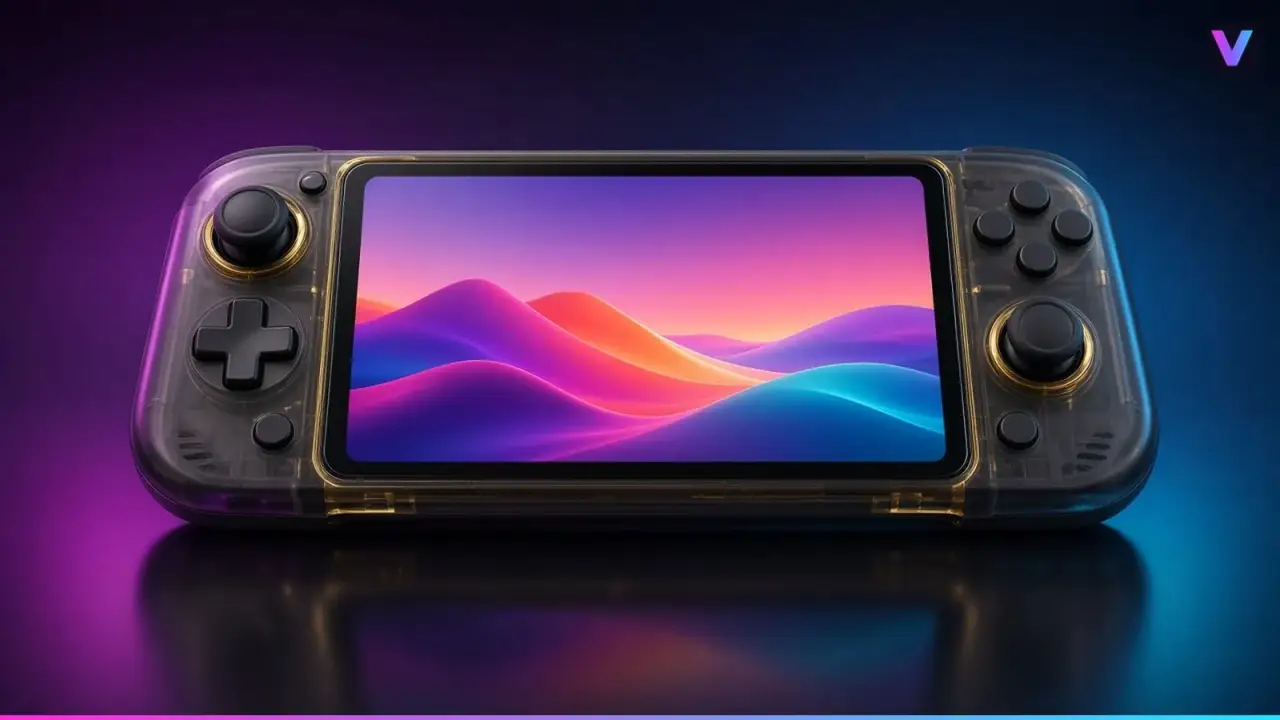
The ROG Xbox Ally X20 is ASUS’s 20th-anniversary edition of its Xbox-branded handheld gaming PC. It launched on 15 October 2026 at $1,299, or $2,499 in a bundle with ROG XREAL R1 Edition 20 AR glasses, and it adds a 7.4-inch OLED screen, TMR joysticks, a transforming D-pad and better cooling, according to the official ASUS press release.
It is the most premium OLED handheld ASUS has made, and it fixes real complaints about earlier models. But it costs $300 more than the ROG Xbox Ally X, which stays on sale at $999. This guide covers the price, full specs, what is new and who should buy which model.
 SHORT
Key facts
- Price: $1,299 standalone, $2,499 with XREAL R1 Edition 20 glasses, a dbrand Killswitch case and a Pelican case (ASUS)
- Chip: AMD Ryzen AI Z2 Extreme, with 24GB LPDDR5X and a 1TB SSD (ROG spec page)
- Screen: 7.4-inch 1080p OLED, 120Hz, with VRR
- Controls: TMR sticks with a 3% dead zone and a 4-way/8-way transforming D-pad
- Older models: ROG Xbox Ally ($599) and Ally X ($999) remain on sale
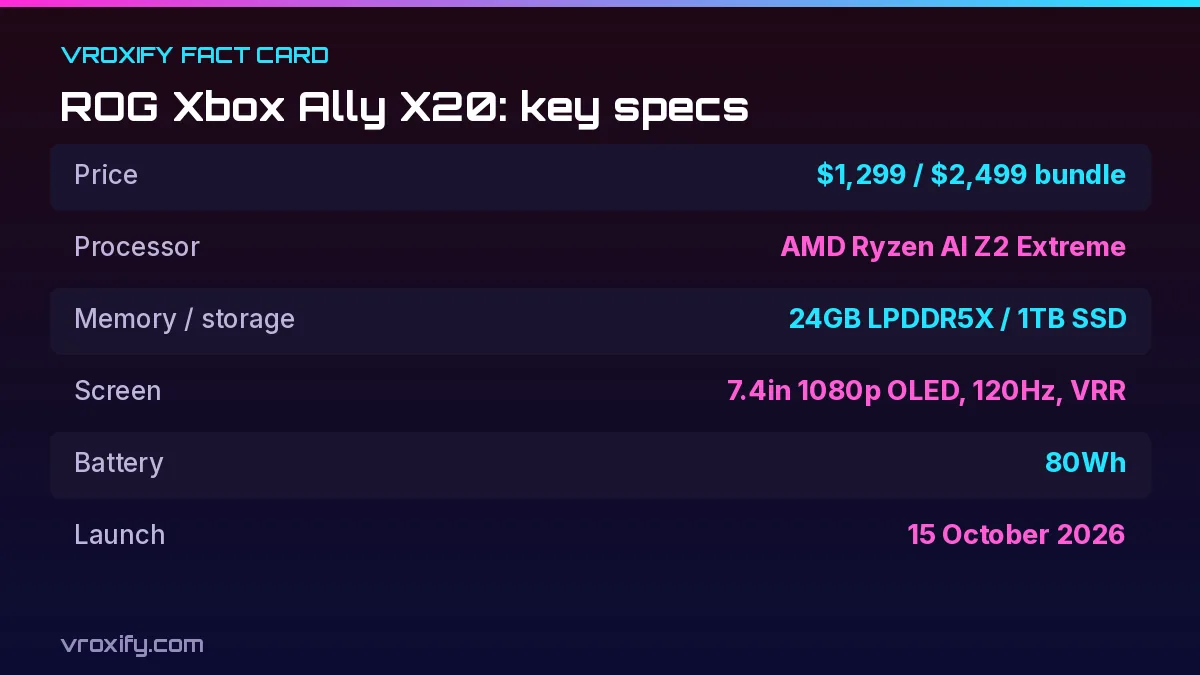
ROG Xbox Ally X20 price and bundles
| Version | US price | What’s in the box |
|---|---|---|
| ROG Xbox Ally X20 | $1,299 | The handheld |
| ROG Xbox Ally X20 Bundle | $2,499 | Handheld, ROG XREAL R1 Edition 20 AR glasses, dbrand Killswitch case with exclusive skin and stick caps, Pelican Protector case |
Tom’s Hardware lists the standalone price as $1,299.99. Prices in the UK, Canada and Australia vary by retailer, so check local stores.
Is the bundle worth $1,200 extra?
The bundle is aimed at collectors. The AR glasses let you play on a large virtual screen, and the Pelican case is built to carry everything. If you don’t specifically want AR glasses, the standalone OLED handheld is the better buy, and you can add a case separately for much less.
ROG Xbox Ally X20 full specs
| Spec | ROG Xbox Ally X20 |
|---|---|
| Processor | AMD Ryzen AI Z2 Extreme (8 cores, 16 threads) |
| Memory | 24GB LPDDR5X |
| Storage | 1TB PCIe 4.0 SSD |
| Display | 7.4-inch 1080p OLED, 120Hz, VRR, ROG Nebula HDR |
| Brightness | 600 nits SDR, 1,400 nits HDR, Dolby Vision |
| Glass | Gorilla Glass Victus, touch screen |
| Battery | 80Wh, 68W USB-C charger |
| Ports | 1x USB4 (Thunderbolt 4 compliant), 1x USB 3.2 Gen 2 Type-C, microSD Express, 3.5mm audio |
| Weight | 756 g (1.67 lb) |
| Wireless | Wi-Fi 6E, Bluetooth 5.4 |
| Sticks | TMR (magnetic), 3% dead zone |
| D-pad | Transforming, 4-way to 8-way |
| Software | Xbox full-screen experience on Windows, Armoury Crate SE |
The processor, memory and storage match the existing ROG Xbox Ally X, so raw performance is similar. The X20 is about the screen, controls, cooling and design.
What’s new on the ROG Xbox Ally X20
1. A 7.4-inch OLED screen
The headline upgrade is ROG’s new Nebula HDR Display with an OLED panel. OLED gives perfect blacks and much richer contrast than LCD, which makes dark games and HDR content look dramatically better. The screen runs at 120Hz and supports variable refresh rate, which reduces tearing when frame rates dip, a common situation on any handheld.
2. TMR joysticks
ASUS uses magnetic TMR sensors in the joysticks, designed to “significantly reduce the potential for stick drift,” with a tight 3% dead zone. Stick drift is one of the most common long-term complaints about handhelds, so this is a meaningful upgrade.
3. A transforming D-pad
The D-pad switches from four-way to eight-way movement with no tools. ASUS pitches this at fighting game players, who need clean diagonals, but it also helps in retro games.
4. Better cooling
ASUS redesigned the cooling to send airflow down three paths: behind the OLED panel, across the heatsink fins and directly to the processor. New fans with fewer but larger blades improve airflow by 20%, and the heatsink fin area is 11% larger. Better cooling usually means quieter fans and more consistent performance.
5. Travel Mode
A new Travel Mode limits charging power to 65W, so you can charge from plane and train seat outlets that can’t supply full power.
6. Anniversary design
The X20 celebrates the 20th anniversary of Republic of Gamers, founded in 2006. Tom’s Hardware describes a translucent shell, rubberised grips and a black-and-gold ROG 20th Anniversary logo.
20 years of ROG and the road to the X20
The X20 marks the 20th anniversary of Republic of Gamers, which ASUS formed in 2006. ROG’s handheld story is much shorter:
| Year | Handheld |
|---|---|
| 2023 | Original ROG Ally |
| 2024 | ROG Ally X, with a bigger battery |
| 2025 | ROG Xbox Ally and ROG Xbox Ally X, built with Xbox |
| 2026 | ROG Xbox Ally X20, the OLED anniversary edition |
Each generation has addressed feedback from the last. The X20 continues that pattern with the screen and stick upgrades players asked for most.
The XREAL R1 AR glasses bundle explained
The $2,499 bundle includes ROG XREAL R1 Edition 20 Gaming AR Glasses. AR glasses of this kind connect to a device and show its screen as a large virtual display floating in front of you. For a handheld, that means you can play on what feels like a big screen while travelling, without a TV.
The bundle also includes a dbrand Killswitch case with an exclusive skin, stick caps and a built-in kickstand, plus a Pelican Protector case with room for every accessory. Tom’s Hardware notes the Killswitch covers much of the X20’s clear plastic, adding black and gold accents.
Who is the bundle for?
Collectors who want the full anniversary set, and frequent travellers who will genuinely use AR glasses. Everyone else will get better value buying the standalone ROG Xbox Ally X20 and choosing their own case.
The OLED screen in detail
According to ROG’s spec page, the X20’s 7.4-inch panel reaches 600 nits in SDR and 1,400 nits in HDR, supports Dolby Vision HDR and FreeSync Premium Pro, and is covered by Gorilla Glass Victus. Those are flagship-level numbers for a handheld.
In practice, this OLED handheld screen makes the biggest difference in three situations:
- Dark games such as horror titles, where OLED’s true blacks remove the grey glow of LCD screens.
- HDR games, where bright highlights such as explosions and sunlight really pop.
- Playing outdoors or near windows, where higher brightness helps.
The resolution stays at 1080p. On a 7.4-inch screen, that is sharp enough, and it keeps demands on the processor reasonable.
Burn-in: should you worry?
OLED screens can suffer burn-in if a static image stays on screen for very long periods. Modern OLED panels include protections, and normal gaming with varied content is low-risk. Simple habits help: use dark mode in menus, let the screen sleep when idle and avoid leaving a game paused on the same image for hours.
Ports, storage and charging
The X20 has two USB-C ports: one USB4 port (Thunderbolt 4 compliant, with DisplayPort 2.1) and one USB 3.2 Gen 2 port. That means you can charge and connect a dock or external display at the same time.
The microSD Express card reader is worth noting. microSD Express cards are much faster than older microSD cards, which makes them more practical for installing games. The 1TB internal SSD fills quickly with modern games, so expandable storage matters.
The included 68W USB-C charger (availability varies by region) handles full-speed charging, and Travel Mode limits charging to 65W for seat-back outlets.
Weight and size
At 756 g (1.67 lb), the X20 is not light. It is comfortable for sessions at a desk or on a sofa, but some players may want a stand or the dbrand case’s kickstand for long play on a table.
Battery life: what to expect
The 80Wh battery is large for a handheld. Real battery life depends on the game:
- Demanding 3D games at full power drain any handheld quickly, typically in a couple of hours.
- Lighter indie games, retro games and streaming last much longer.
- Lower power modes and frame caps can extend play time a lot.
ASUS has not published a single battery-life figure in the sources we checked, and we haven’t tested the X20 ourselves. Expect similar results to the Ally X in demanding games, with the OLED screen potentially saving power in dark scenes.
ROG Xbox Ally X20 vs ROG Xbox Ally vs Ally X
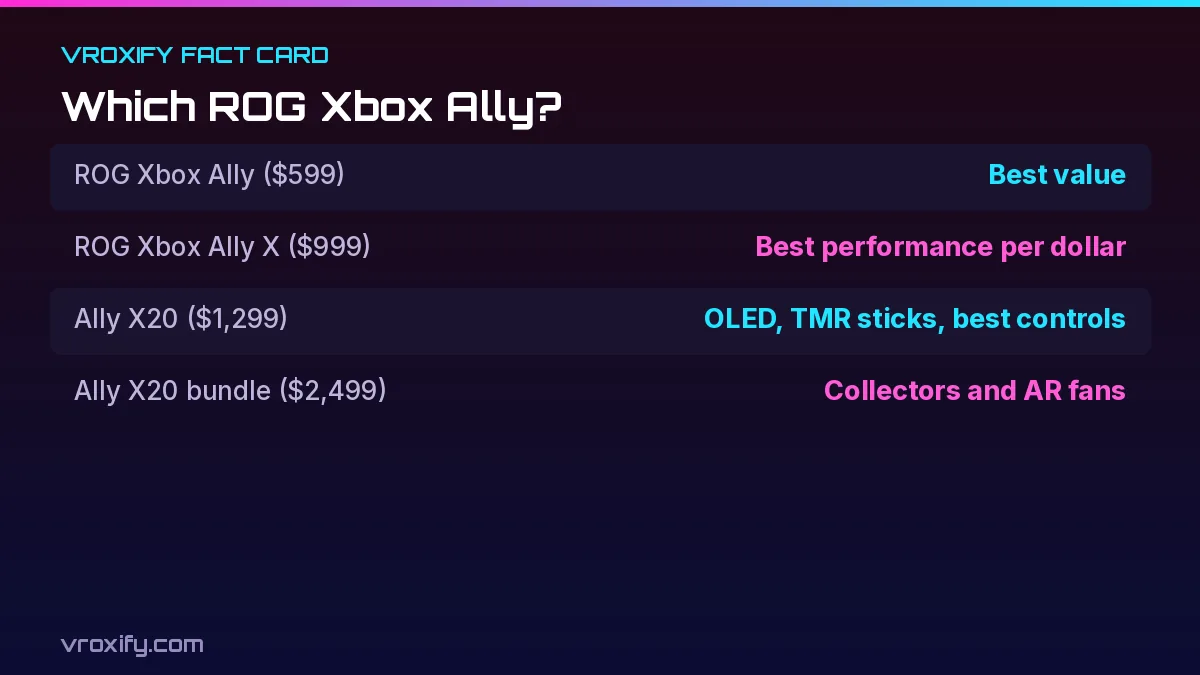
ASUS confirms the original models remain available at their launch prices.
| ROG Xbox Ally | ROG Xbox Ally X | ROG Xbox Ally X20 | |
|---|---|---|---|
| Price | $599 | $999 | $1,299 |
| Screen | LCD | LCD | 7.4” OLED, VRR |
| Performance tier | Entry | High | High (same chip as Ally X) |
| Sticks | Standard | Standard | TMR, 3% dead zone |
| D-pad | Standard | Standard | Transforming 4/8-way |
| Best for | Budget and indie games | Best performance per dollar | Best screen and controls |
Which should you buy?
- ROG Xbox Ally ($599) if you mostly play indie games, older titles or Game Pass streaming and want the lowest price.
- ROG Xbox Ally X ($999) if you want the same performance as the X20 and don’t mind an LCD screen.
- ROG Xbox Ally X20 ($1,299) if the OLED screen and TMR sticks matter to you, and you’ll keep the device for years.
The X20’s extra $300 buys a better screen and better controls, not more frames per second.
Setting up your ROG Xbox Ally X20
These tips apply to most Windows handhelds and will help you get the most from the X20:
- Run Windows Update and Armoury Crate SE updates first. New handhelds often get important firmware and driver updates in the first weeks.
- Update AMD graphics drivers. Newer drivers can improve performance and fix game-specific issues.
- Set a frame cap. Locking games to 40, 45 or 60 FPS often gives smoother play and better battery life than chasing an unstable higher number. VRR helps make lower frame rates feel smooth.
- Use upscaling. AMD FSR and similar technologies help demanding games run well at 1080p.
- Add a fast microSD Express card for extra games, keeping the internal SSD for your most-played titles.
- Customise buttons. ASUS says the software now has more customisable buttons. Map shortcuts you use often.
- Try Travel Mode before your next trip so you know how it behaves on low-power outlets.
Game Pass and the ROG Xbox Ally X20
The X20 is built around the Xbox experience on Windows, and ROG’s spec page lists Xbox Game Pass among its features. For many players, Game Pass is the easiest way to build a library on the device, with day-one Xbox games on PC and the option to stream games through Xbox Cloud Gaming when your tier includes it.
Remember that Game Pass plans and included features change over time. Check the current plan details before you subscribe.
Who should wait instead of buying the ROG Xbox Ally X20?
- Players happy with an Ally X. The X20 has the same performance. Unless the OLED screen or TMR sticks matter to you, upgrading makes little sense.
- Budget buyers. The $599 ROG Xbox Ally or a discounted Ally X offers better value.
- Players hoping for more power. If you want higher frame rates, the X20 is not faster. A future processor generation would be the meaningful jump.
- Sale hunters. Black Friday falls on 27 November, and handhelds are popular deals. Watch for discounts on all three models.
Our verdict
The ROG Xbox Ally X20 is the best version of ASUS’s Xbox handheld if you value screen quality and controls. The OLED panel, TMR sticks and transforming D-pad fix real complaints, and the cooling upgrade should make it quieter. But it is a premium, collector-flavoured device: the same performance as the Ally X for $300 more. Buy it for the screen and the feel, not for extra speed.
Can the ROG Xbox Ally X20 play GTA 6?
Not natively at launch. GTA 6 arrives on 19 November on PS5 and Xbox Series X|S only, and there is no PC version date, so it can’t be installed on any Windows handheld. Our GTA 6 platforms guide explains the official platform list and what Rockstar has said about cloud streaming.
For other big games, the X20 is a strong handheld. It’s well suited to Xbox PC games such as Fable when it launches, though official handheld settings for Fable have not been published.
ROG Xbox Ally X20 buying checklist
Before you order, run through these questions:
- Do I care about OLED? If dark scenes, HDR and contrast matter to you, yes. If not, the Ally X is $300 cheaper with the same performance.
- Have I had stick drift before? If so, TMR sticks are a strong reason to choose the X20.
- Do I play fighting or retro games? The transforming D-pad is a real benefit for you.
- Is 1TB enough? Budget for a microSD Express card if you keep many large games installed.
- Will I use AR glasses? If not, skip the $2,499 bundle.
- Can I wait for Black Friday? Deals on handhelds are common in late November.
- Where will I buy? Buy from ASUS or a major retailer so warranty support is straightforward in your country.
If you answered yes to the first two questions, the ROG Xbox Ally X20 is likely the right handheld for you.
FAQ
How much is the ROG Xbox Ally X20?
The ROG Xbox Ally X20 costs $1,299 on its own, or $2,499 in a bundle with ROG XREAL R1 Edition 20 AR glasses, a dbrand Killswitch case and a Pelican case.
When did the ROG Xbox Ally X20 launch?
It launched on 15 October 2026.
Is the ROG Xbox Ally X20 faster than the Ally X?
No, they share the same AMD Ryzen AI Z2 Extreme processor, 24GB memory and 1TB storage. The X20 adds an OLED screen, TMR sticks, a transforming D-pad and improved cooling.
Does the ROG Xbox Ally X20 have stick drift?
ASUS uses magnetic TMR sensors designed to significantly reduce the potential for stick drift. No stick technology is guaranteed forever, but TMR is a big improvement over traditional sensors.
How much does the ROG Xbox Ally X20 weigh?
ROG lists the weight as 756 g (1.67 lb).
Can I expand the storage on the ROG Xbox Ally X20?
Yes. It has a microSD Express card reader, and the internal storage is a 1TB PCIe 4.0 SSD.
Is the ROG Xbox Ally X20 an OLED handheld?
Yes. It has a 7.4-inch 1080p OLED screen with a 120Hz refresh rate and variable refresh rate support.
Sources
Prices and specs checked on 14 November 2026. Vroxify is not affiliated with ASUS or Microsoft. Artwork is original and shows no real product.
Related articles
RTX Spark Laptops for Gaming: Models, Prices, Performance and Who Should Buy One
Our buying guide to RTX Spark laptops: the N1X chip, all nine launch models, prices, what early testers found about gaming performance, and whether a gamer should buy one or a traditional gaming laptop.

Wolfenstein 3 Confirmed: MachineGames Is in Production, With BJ and Grace Returning
Wolfenstein 3 is officially in production at MachineGames, Xbox CEO Asha Sharma confirmed on 12 November. Brian Bloom and Debra Wilson return. Here's everything we know, and what we don't.

Fable Release Date: 23 February 2027 on Xbox, PC and PS5, Plus Early Access and Editions
Fable launches on 23 February 2027 on Xbox Series X|S, PC and PS5, with early access from 18 February for the Premium Edition. We cover prices, Game Pass, the cast and the new gameplay.